Business Software Selection Checklist
Know what to compare before investing in CRM, ERP, inventory, website, mobile app, or custom software solutions.
Read checklist
Use verified client logos, approved screenshots or implementation examples as proof. Avoid customer-count, rating and percentage-result claims until confirmed.



















Join 500+ businesses using Arth CRM to boost sales productivity and lead conversion
Direct answers for sales teams comparing CRM, Excel, customization, WhatsApp communication, migration, cost and implementation.
CRM software helps a business manage leads, follow-ups, customer communication, sales activities, pipeline status and reporting from one structured system.
Move from Excel to CRM when multiple people handle leads, follow-ups are missed, ownership is unclear, reporting is manual or customer history is scattered across sheets and messages.
Ready CRM is better when the sales process is close to standard. Custom CRM is better when lead stages, approvals, reports, integrations or user roles are unique.
WhatsApp communication can be included where the selected workflow and integration method support it. The exact setup should be confirmed during CRM discovery.
Usually, yes. Excel leads can often be imported after mapping fields, cleaning duplicates, checking phone/email consistency and validating owner or stage values.
CRM cost depends on the commercial model, users, branches, workflow configuration, custom modules, integrations, migration, mobile access and support scope.
CRM implementation time depends on lead stages, user roles, data import quality, reports, integrations, training and how quickly the sales workflow is confirmed.
Yes. CRM can structure follow-up dates, owners, reminders, tasks and overdue visibility so managers can review sales activity more consistently.
CRM software is a customer relationship management system designed to help businesses manage leads, track sales pipelines, automate workflows, and improve team collaboration. It combines web-based admin control with a mobile app for sales teams.
At Arth Technology, our CRM software includes:
You get complete source code ownership and a solution tailored to your specific sales workflow.
Lead ? Pipeline ? Deal ? Conversion ? Retention
Lead Management
Mobile Sales App
Pipeline Tracking
Workflow Automation
WhatsApp Integration
Analytics & Reports
Team Dashboard
Lead capture, assignment, source tracking, qualification workflow, and nurturing sequences.
View leads, update deal status, add notes, and manage tasks from mobile phones.
Track deals through stages, visualize pipeline, and forecast revenue accurately.
Record sales calls, review conversations, train teams, and maintain communication records.
Schedule follow-ups with date, time, and notes to prevent missed opportunities.
Send messages, brochures, quotes, and updates directly from the CRM platform.
Assign tasks, track progress, and manage team activities from one dashboard.
Monitor conversion rates, deal velocity, team performance, and revenue metrics.
Track team activity, deal status, conversion rates, and branch-wise reports.
Control what sales reps, team leaders, managers, and admins can view or edit.
Upload existing lead data from Excel and distribute it to your team without manual entry.
Add business-specific modules for real estate, education, insurance, healthcare, or other industries.
Automate every stage of the sales workflow from lead capture to deal closure. Track progress, set reminders, and ensure no lead falls through the cracks.
View pipeline, deal status, team performance, and revenue metrics.
Track lead status, source, priority, and assigned sales rep in one view.
Visualize deals across stages, forecast revenue, and identify bottlenecks.
Monitor conversion rates, team productivity, and sales performance.
Track property inquiries, site visits, project interest, and booking status.
Manage admissions inquiries, counseling calls, course interest, and enrollment follow-ups.
Manage policy inquiries, renewal reminders, premium follow-ups, and lead conversion.
Track loan inquiries, customer documents, eligibility follow-ups, and approval status.
Manage patient inquiries, appointment calls, reminder calls, and service follow-ups.
Track solar leads, site assessments, proposals, and installation follow-ups.
Manage vehicle inquiries, test drives, sales deals, and customer follow-ups.
Track candidate leads, job applications, interview scheduling, and placement follow-ups.
Manage travel inquiries, package booking, payment follow-ups, and customer support.
Track IT service leads, project inquiries, demos, and contract follow-ups.
| Parameter | Manual Sales / Excel | Arth CRM Software |
|---|---|---|
| Lead Management | Manual and scattered | Centralized and organized |
| Pipeline Visibility | No clear visibility | Real-time pipeline tracking |
| Follow-Up | Often missed | Automated reminders |
| Team Collaboration | Limited coordination | Shared dashboards |
| WhatsApp Integration | Scattered chats | Connected with lead workflow |
| Reports | Manual reporting | Real-time analytics |
| Team Productivity | Difficult to measure | Performance tracking |
CRM pricing depends on the commercial model, users, branches, modules, integrations, mobile access, migration and support scope. Confirm current rental, license or white-label options during the demo discussion.
Exact CRM pricing should be confirmed after reviewing users, branches, workflow changes, integrations and migration needs.
Phase 7 removes unverified ratings, fake review scores and percentage-result claims. Use the case studies below as factual proof of CRM and sales workflow capability.
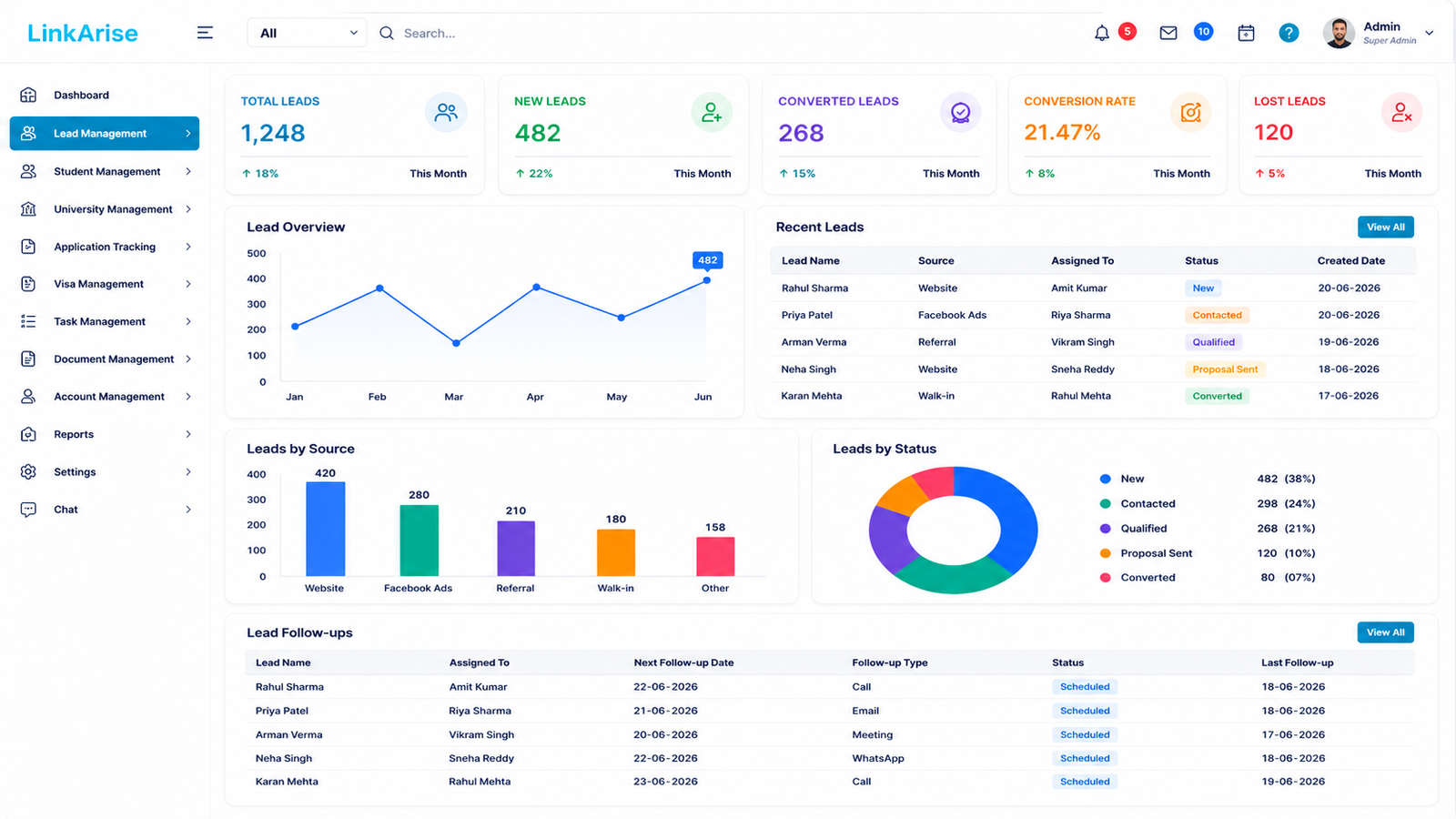
Overseas education CRM workflow
Telecalling CRM workflow
CRM, AMC and field service workflow
Understand your sales workflow.
Tailored settings and modules activation.
Secure transfer of existing lead data.
Hands-on training and launch support.
Lead, follow-up and reporting modules should match the sales process.
Training, fixes and improvements can be scoped as part of implementation.
Deep understanding of sales processes
Built for your specific workflow
Complete mobile app for sales teams
Manage multiple locations seamlessly
24/7 assistance
100% IP rights
We provide CRM software implementation and customization services across Gujarat and all major cities in India. Onsite support available and remote delivery across the country.
Proven techniques to improve conversion rates using CRM automation.
Read MoreHow to use call recording for training and quality improvement.
Read MoreCentralized strategies for managing multiple locations effectively.
Read MoreCRM software is a system used to manage leads, sales pipelines, customer interactions, and team collaboration from one centralized platform.
Yes. Arth CRM includes a mobile app for sales teams to view leads, update deals, add notes, and manage tasks from their phones.
Yes. Managers can track deal status, conversion rates, team productivity, and revenue metrics through the dashboard.
Yes. Existing leads can be imported from Excel and assigned to sales reps or campaigns.
Yes. WhatsApp integration is available for sending messages, brochures, quotes, and updates directly from the CRM.
Yes. The system can be customized for real estate, education, insurance, finance, healthcare, solar, automobile, recruitment, travel, and IT services.
Yes. Arth Technology provides custom CRM development, so modules, workflows, reports, and user roles can be customized as per your business process.
You can request a free demo by filling out the inquiry form, calling Arth Technology, or sending a WhatsApp message.
Explore practical guides that help you choose the right solution, calculate automation ROI, and plan digital growth with confidence.
Know what to compare before investing in CRM, ERP, inventory, website, mobile app, or custom software solutions.
Read checklistLearn how to estimate time savings, error reduction, faster follow-up, and long-term value from business automation.
Calculate ROIPlan a connected growth system with website, SEO, ads, social media, lead capture, CRM, and conversion tracking.
Explore playbookGet a free demo and custom CRM quote. Let's discuss how we can help you manage leads better and grow your business.
Lead Management | Follow-up Workflow | Sales Activity Tracking | Mobile CRM Access | WhatsApp Contact Channel
CRM proof examples covering overseas education, telecalling, sales/service and field operations.
A multi-role overseas education CRM connecting lead management, counselling, applications, admissions, visa workflows, student payments and agent commission tracking.
TelecallingExtream FincareA telecalling CRM for finance/DSA teams to create campaigns, upload leads, allocate leads to telecallers and track lead activity and follow-ups.
Field ServiceSminder ServiceA CRM, AMC and field service platform for equipment sales and service workflows, covering customer requests, sales, service engineer allocation and service completion.
Connect inquiry, follow-up, quotation, order, manufacturing, QA, delivery, installation, invoice and payment reminder stages.
Use the CRM vs Excel guide to decide when lead ownership, reminders, duplicate handling and pipeline visibility need a CRM workflow.
Use this Phase 14 resource before a discovery call.