





















Quick Answers About Telecalling CRM Software
What is Telecalling CRM Software?
Telecalling CRM software is a lead and call management system that helps businesses assign leads to telecallers, track calls, record conversations, schedule follow-ups, send WhatsApp messages, and measure team performance from a centralized dashboard.
Why do businesses need telecalling software?
To centralize lead data, automate follow-ups, track call activity, monitor telecaller performance, improve conversion rates, and reduce manual work that leads to missed opportunities.
How much does telecalling CRM cost in India?
Telecalling CRM cost ranges from ₹1,000 per user per month to custom enterprise pricing depending on features, users, branches, and customization. Contact us for a free quote based on your team size and requirements.
Does telecalling CRM include an Android app?
Yes, Arth Telecalling CRM includes a dedicated Android telecaller app so your calling team can view assigned leads, make calls, update status, add notes, and schedule follow-ups from their mobile phones.
What is Telecalling CRM Software?
Telecalling CRM software is a lead and call management system designed specifically for businesses that depend on outbound calling, lead nurturing, and follow-up management. It combines web-based admin control with a mobile app for telecallers.
At Arth Technology, our telecalling CRM includes:
- ✅ Lead management and assignment
- ✅ Android telecaller app with calling features
- ✅ Auto dialer support for faster calling
- ✅ Call recording and quality monitoring
- ✅ Follow-up reminder automation
- ✅ WhatsApp integration for communication
- ✅ Telecaller performance reports
- ✅ Campaign and branch management
You get complete source code ownership and a solution tailored to your specific calling workflow.
Complete Calling Workflow Management
Lead → Assignment → Call → Follow-Up → Conversion
Lead Management
Android Telecaller App
Call Recording
Follow-Up Automation
WhatsApp Integration
Performance Reports
Manager Dashboard
Challenges Faced by Telecalling Teams
Common Operational Challenges
- Missed follow-ups and lost leads
- No visibility into call activity
- Scattered lead data in spreadsheets
- Low conversion rates
- Manual reporting and tracking
- Poor team coordination
Our CRM Solutions
- Automated follow-up reminders
- Real-time call tracking and logs
- Centralized lead database
- Lead scoring and status tracking
- One-click performance reports
- Team dashboard and branch management
Complete Telecalling CRM Modules
Lead Management
Lead capture, assignment, source tracking, qualification workflow, and nurturing sequences.
Android Telecaller App
View assigned leads, make calls, update status, add notes, and manage daily tasks from mobile.
Auto Dial Support
Speed up outbound calling by reducing manual number dialing and improving daily call volume.
Call Recording
Track call quality, review conversations, train telecallers, and maintain transparent communication records.
Follow-Up Reminders
Schedule next call reminders with date, time, remarks, and lead status to prevent missed opportunities.
WhatsApp Integration
Send inquiry responses, follow-up messages, brochures, payment reminders, and status updates through WhatsApp.
Campaign Management
Create campaigns for loan leads, insurance leads, real estate projects, education inquiries, or support calls.
Performance Reports
Monitor total calls, connected calls, missed calls, hot leads, pending follow-ups, and conversion rate.
Manager Dashboard
Track team activity, lead status, call outcome, branch-wise reports, and daily productivity.
Role-Based Access
Control what telecallers, team leaders, managers, and admins can view or edit inside the CRM.
Excel Import
Upload existing lead data from Excel and distribute it to your team without manual entry.
Custom CRM Modules
Add business-specific modules for loans, real estate, admission, insurance, healthcare, or service support.
Complete Telecalling Workflow Automation
Automate every stage of the calling workflow from lead capture to final conversion. Track progress, set reminders, and ensure no lead falls through the cracks.
Powerful CRM Screens Designed for Telecalling Teams
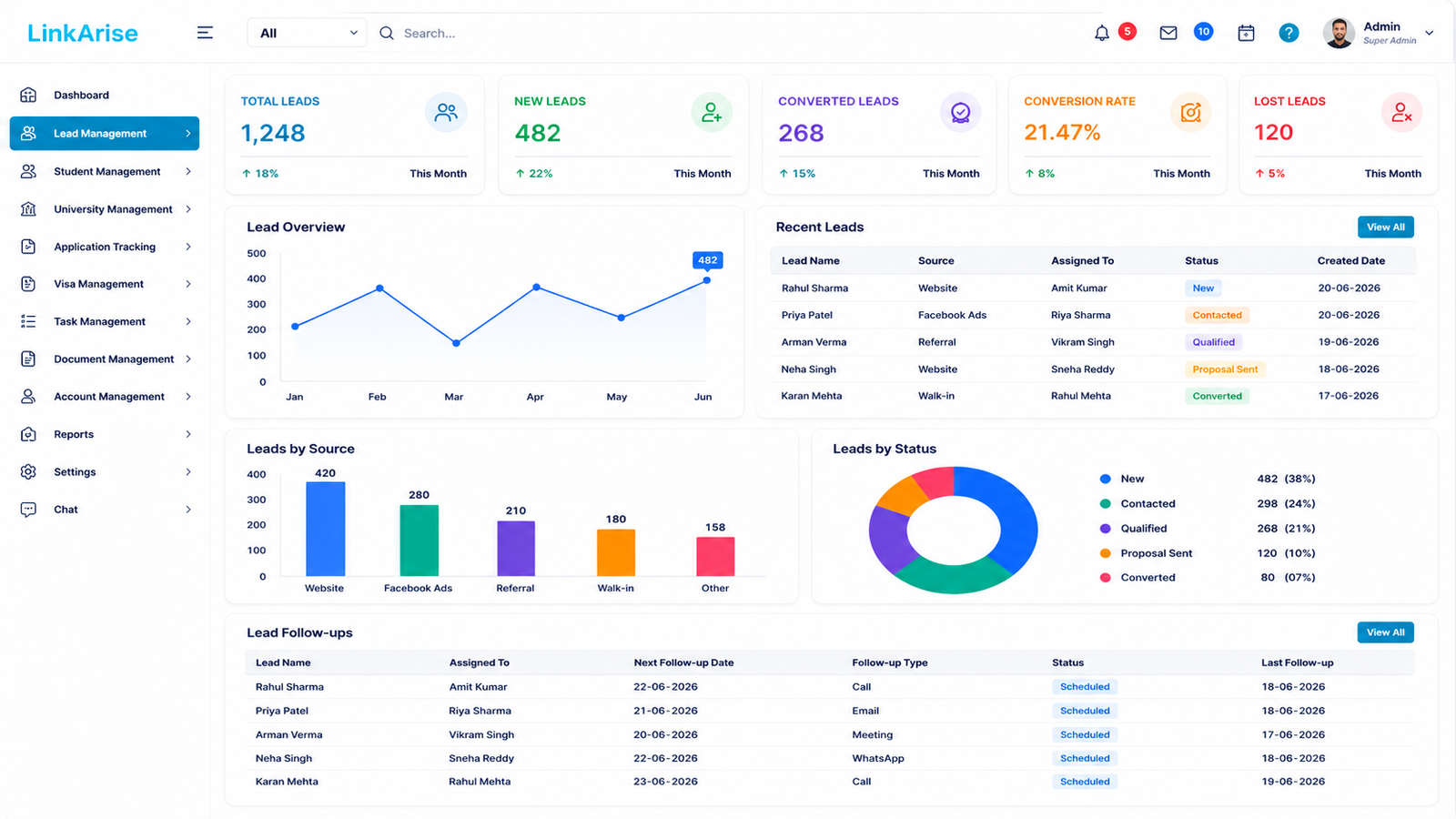
Telecaller Dashboard
View assigned leads, call history, daily tasks, and performance metrics.
Lead Management
Track lead status, source, priority, and assigned telecaller in one view.
Call Recording Management
Review call recordings, quality scores, and conversation insights.
Performance Reports
Monitor team productivity, conversion rates, and calling activity.
Industries That Use Our Telecaller App
Call Centers
Manage outbound campaigns, agent calls, call outcomes, and daily calling targets.
DSA & Loan Agencies
Track loan inquiries, customer documents, eligibility follow-ups, and approval status.
Insurance Teams
Manage policy inquiries, renewal reminders, premium follow-ups, and lead conversion.
Real Estate Teams
Track property inquiries, site visit follow-ups, project interest, and booking status.
Education Institutes
Manage admission inquiries, counseling calls, course interest, and enrollment follow-ups.
Healthcare Teams
Manage appointment calls, patient inquiries, reminder calls, and service follow-ups.
Customer Support
Track support calls, service status, complaint follow-ups, and resolution history.
Sales Teams
Manage sales leads, prospecting calls, demos, quotations, and deal follow-ups.
Manual Calling vs Arth Telecalling CRM
| Parameter | Manual Calling / Excel | Arth Telecalling CRM |
|---|---|---|
| Lead Assignment | Manual and time-consuming | Quick assignment to telecallers |
| Call Tracking | No clear visibility | Call logs and activity tracking |
| Follow-Up | Often missed | Automated reminders |
| Call Recording | Not available | Available for review and training |
| WhatsApp Updates | Scattered chats | Connected with lead workflow |
| Reports | Manual reporting | Real-time dashboard and analytics |
| Team Productivity | Difficult to measure | Telecaller-wise performance tracking |
Android Telecaller App for Teams on the Go
Flexible Telecalling CRM Pricing Options
Whether you are a small team, a growing call center, or a multi-branch enterprise, we offer deployment options to suit your business needs.
SaaS Subscription
- Complete CRM Features
- Lead Management
- Android Telecaller App
- Follow-Up Tracking
- Call Recording
- WhatsApp Integration
- Reports & Analytics
- Free Updates & Maintenance
Single Branch Edition
- Unlimited Users
- Single Branch Management
- Lead & Inquiry Management
- Android Telecaller App
- Call Recording
- WhatsApp Integration
- Reports & Dashboard
- Follow-Up Automation
Enterprise Edition
- Everything in Single Branch
- Multi-Branch Management
- Advanced Role Access
- Custom Reports
- API Integrations
- White Label Branding
- Dedicated Support
- Custom Module Development
Book a Free Demo to find the right solution for your calling team.
Success Stories from Telecalling Teams
See how businesses use Arth Telecalling CRM to improve lead management, calling productivity, and team performance.
DSA Loan Agency
Lead Management | Mumbai
Insurance Sales Team
Policy Follow-Ups | Vadodara
Real Estate Sales Team
Property Inquiry Follow-Up | Surat
Education Institute
Admission Counseling Calls | Delhi
Fast & Easy CRM Implementation
Step 1: Requirement Analysis
Understand your calling workflow.
Step 2: CRM Setup & Configuration
Tailored settings and modules activation.
Step 3: Data Migration
Secure transfer of existing lead data.
Step 4: Training & Go Live
Hands-on training and launch support.
Why Choose Arth Technology for Telecalling CRM
Proven CRM expertise
Long-term partnerships
Deep understanding of telecalling processes
Built for your specific workflow
Complete mobile app for telecallers
Manage multiple locations seamlessly
24/7 assistance
100% IP rights
Telecalling CRM Services Across India
We provide telecalling CRM implementation and customization services across Gujarat and all major cities in India. Onsite support available and remote delivery across the country.
Resources for Telecalling Teams
How to Choose the Right Telecalling CRM for Your Team
Key features to look for in a telecalling CRM system.
Read MoreLead Conversion Strategies for Telecalling Teams
Proven techniques to improve conversion rates using CRM automation.
Read MoreCall Recording Best Practices for Call Centers
How to use call recording for training and quality improvement.
Read MoreMulti-Branch Management for Call Centers
Centralized strategies for managing multiple locations effectively.
Read MoreExplore Our Solutions
Frequently Asked Questions About Telecalling CRM Software
Telecalling CRM software is a system used to manage leads, calls, follow-ups, telecaller activity, call history, WhatsApp communication, and sales reports from one dashboard.
Yes. Arth Telecalling CRM includes an Android telecaller app so calling teams can view assigned leads, make calls, update status, add notes, and schedule follow-ups.
Yes. Managers can track total calls, connected calls, missed follow-ups, lead status, hot leads, pending leads, and telecaller-wise performance reports.
Yes. Existing leads can be imported from Excel and assigned to telecallers or campaigns.
Yes. WhatsApp communication can be included for inquiry response, follow-up messages, brochures, and lead communication.
Yes. The system can be customized for DSA businesses, loan agencies, insurance teams, real estate sales, education institutes, healthcare teams, and support teams.
Yes. Arth Technology provides custom CRM development, so modules, lead stages, reports, user roles, and workflow can be customized as per your business process.
You can request a free demo by filling out the inquiry form, calling Arth Technology, or sending a WhatsApp message.
Ready to Transform Your Telecalling Team Performance?
Get a free demo and custom telecalling CRM quote. Let's discuss how we can help you manage leads better and grow your business.
900+ Projects | 50+ Developers | 9+ Years | Lead Management | Android App | Call Recording | WhatsApp Integration | Full Source Code Ownership