
Manufacturing ERP software brings operational information into a shared system so teams can coordinate orders, materials, production, quality checks, inventory and dispatch. The aim is to give the right people dependable information at each handoff, from an accepted customer order to the finished goods leaving the factory.
ERP scope varies by manufacturer. A make-to-order unit, a batch producer and a company assembling products from purchased components may need different planning rules. Start with the work you need to control, then select modules and integrations around that work.
For a product overview focused on manufacturing workflows, see Manufacturing ERP software. If your processes call for a system tailored to your teams and integrations, explore our CRM and ERP development service.
What does manufacturing ERP software do?
A manufacturing ERP system connects business records and processes that might otherwise be tracked in separate spreadsheets or tools. Depending on scope, a shared item and order record can inform material planning, purchasing, production status, inspection, stock availability and delivery preparation. Teams can then work from consistent statuses instead of re-entering the same information in multiple places.
An ERP is not automatically a substitute for every specialist tool. CAD, machine control, payroll, accounting or warehouse systems may remain separate and exchange selected information with ERP. Decide which system owns each record and when data should move between systems.
Core manufacturing ERP modules to evaluate
1. Sales orders and production demand
Order management records customer requirements, quantities, dates, specifications and changes. A useful workflow makes the confirmed demand visible to planning and operations, while preserving a clear approval trail for revisions.
2. Bills of materials and routings
A bill of materials (BOM) describes components or raw materials required for a product. Routings or process plans describe the operations and work centres used to make it. Review how the system should handle revisions, substitutes, scrap allowances, units of measure and product variants.
3. Material planning and procurement
Material requirements planning uses demand, BOMs, stock and lead times to help identify what may need to be purchased or produced. Purchasing workflows can cover requisitions, approvals, purchase orders, supplier receipts and inspection. Planning is only as useful as the item data, lead times and inventory records behind it.
4. Production scheduling and shop-floor reporting
Production planning allocates work across stages, teams or machines according to capacity and priorities. Shop-floor updates can record starts, completions, quantities, material consumption and delays. Define the level of detail operators can maintain consistently before asking for real-time dashboards.
5. Quality management
Quality workflows may include incoming inspection, in-process checks, final inspection, non-conformance records and corrective actions. Specify where checks occur, what evidence is required, who can release a batch and how rejected material should be recorded.
6. Inventory, warehouse and dispatch
Inventory workflows can track raw materials, work in progress and finished goods across locations. Transfers, reservations, batch or serial tracking and dispatch records should reflect how stock is actually handled. Accurate transactions help sales and production teams understand availability.
7. Costing and operational reports
Depending on accounting scope and integrations, ERP may bring together material, labour or process data to support cost analysis. Reports should answer concrete questions such as order progress, material shortages, work in progress, production output, inspection results and dispatch status.
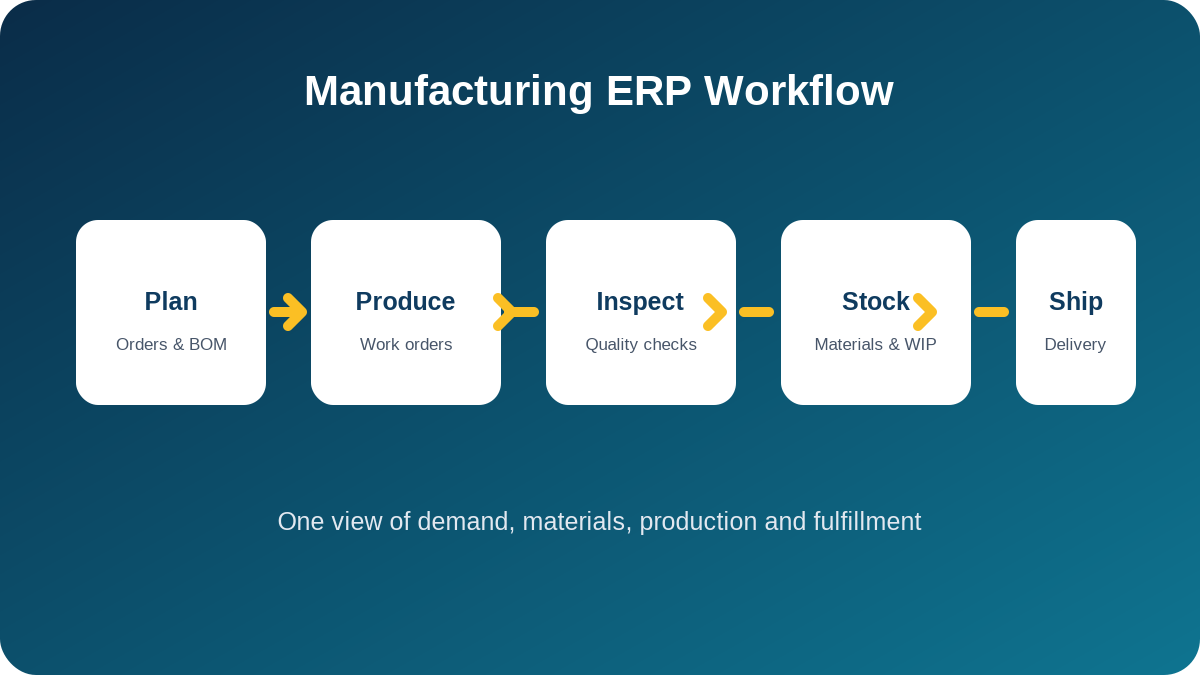
How the ERP workflow connects the factory
- Confirm demand: Record the order, specification, quantity and requested delivery date.
- Plan materials and capacity: Check the BOM, stock, purchase lead times and available production capacity.
- Release work: Create or schedule production orders with the required routing and material issue steps.
- Record progress and quality: Update completed quantities, consumption, inspection outcomes and exceptions.
- Receive and dispatch: Move accepted goods to finished inventory, prepare dispatch documents and update order status.
- Review performance: Compare planned and actual activity to identify recurring bottlenecks or data gaps.
These steps can be phased. Some manufacturers begin with item data, inventory and purchasing, then add production scheduling or quality workflows after the foundations are reliable. See our inventory management software for stock-control workflows, or review our manufacturing industry solutions for the wider operational context.
How to choose manufacturing ERP software
- Map real processes: Document how work flows today, including exceptions, rework, approvals and subcontracting.
- Prioritize requirements: Separate essential workflows from useful future improvements. Identify the users and decisions behind each requirement.
- Validate product data: Review item codes, units, BOMs, routings, locations, suppliers and opening stock before migration.
- Check planning fit: Confirm how the system represents make-to-stock, make-to-order, batch production, variants and capacity constraints relevant to your factory.
- Review integrations: List accounting, CAD, e-commerce, machine or reporting tools to connect. Agree data ownership, sync frequency and error handling.
- Plan permissions and traceability: Define who can edit masters, approve transactions, release work and view sensitive information.
- Test with realistic scenarios: Walk through a normal order as well as a revision, shortage, rejected inspection or delivery delay.
- Compare total effort: Include configuration, migration, integrations, training, support and internal time—not only subscription or licence cost.
Plan implementation around data and adoption
ERP implementation is a business process project as well as a software project. Assign process owners from sales, stores, purchasing, production, quality and accounts. Clean and agree master data before migration, then test representative transactions with the people who will use the system.
A phased rollout can reduce disruption when departments need time to learn new routines. Set clear acceptance criteria for each phase, provide role-based training and define a support path for questions during go-live. After launch, review adoption and data quality alongside operational measures such as schedule adherence, stock accuracy, material variance or rework—where those measures are captured reliably.
Questions manufacturers often ask
Is manufacturing ERP different from general ERP?
Manufacturing ERP includes workflows for production demand, BOMs, material planning, work orders, quality and shop-floor progress. The exact capabilities vary, so validate the processes and production methods your business uses.
Can ERP support both inventory and production planning?
Many ERP systems connect inventory records with production demand and material planning. Confirm how the system handles your BOMs, units, stock locations, lead times and production stages.
Can a manufacturer start with a few ERP modules?
Yes. A phased approach can begin with high-priority workflows, provided the data model and integrations are planned so later modules can connect cleanly.
What data should be prepared before implementation?
Common preparation includes item and supplier records, units of measure, BOMs, routings, warehouse locations, opening stock, open orders and user roles. The final list depends on the project scope.
How can we estimate the scope of an ERP project?
Map processes, user roles, reports, integrations, data migration needs and rollout stages. Prioritize must-have workflows and validate them with representative users before finalizing scope.
Planning a Manufacturing ERP Project?
Review your production, inventory and reporting workflows with Arth Technology and identify a practical first phase.
Discuss your requirements